


Why a 4-channel mobile DVR matters to drivers and fleet folks
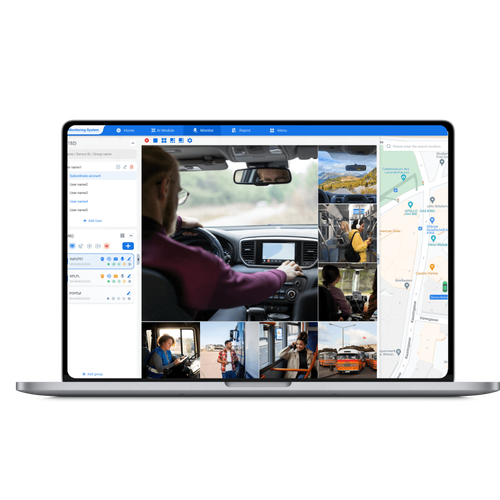
Howzit — if you run vehicles or spend time behind the wheel, you want gear that helps, not hassles. A 4-channel mobile DVR gives you four camera feeds in one compact unit, so you catch front, rear and two side views without fiddling with separate kits. For operators looking to tie video into tracking and reporting, a solid fleet management solution makes that video usable for coaching, incident review and basic compliance. I’ve spent years fitting systems and working next to drivers, so the points below come from real installs and real roadside fixes.

Features drivers actually notice
– Multi-angle recording: simultaneous front, rear and side cameras mean fewer blind-spot complaints. – Continuous loop + event lock: routine footage overwrites, but collisions or panic-button events keep evidence safe. – GPS timestamping: routes and speeds stamped to each clip so you don’t have to guess where something happened. – Low-light performance: practical night vision beats pretty specs when you’re driving at 2 AM. – Rugged power handling: units that tolerate ignition cycles and voltage dips save you headache. These are straightforward items — pick the ones that solve your day-to-day problems rather than chasing the fanciest spec sheet.
How crews use a 4-channel DVR on the road
Think about the people who touch the vehicle each day: drivers, fleet managers, workshop staff. For a Cape Town taxi fleet I worked with, the DVR became the go-to tool for three simple needs: settling customer complaints, coaching risky driving, and documenting incidents for insurers. When systems are paired with modern fleet driver management, managers can pull short clips tied to specific trips and show drivers what to change instead of just telling them. That combo keeps drivers engaged because the feedback is precise, quick and relevant to their shift.
Common mistakes crews make — and how to avoid them
– Mounting cameras too high or angled badly: test from the driver’s seat before finishing the install. – Forgetting power conditioning: add a simple voltage stabiliser if the vehicle’s electrics are noisy. – Skipping retention policy planning: decide how long you store video and where, so legal requests and storage costs don’t surprise you. – Neglecting driver buy-in: show clips during routine coaching — drivers accept new tech when it helps them stay safe or avoid unfair tickets. Fix these early and the system becomes a tool, not a burden.
Alternatives and quick trade-offs
– Single-channel dashcams: cheaper, simpler, but miss side or rear angles you’ll want for lane-change incidents. – 8-channel systems: great for buses or complex fleets, but overkill for most light commercial work and costlier to maintain. – Cloud-only video: instant access but dependent on mobile coverage and recurring fees. Pick based on the problem you’re solving: incident evidence and driver coaching usually point to 4-channel as the sweet spot for value and coverage.
Final take — what makes a setup actually useful
Keep it simple: pick durable hardware, angle cameras to match drivers’ real sightlines, set sensible retention, and use video as coaching, not punishment. That practical approach makes tech accepted on the road and trusted in the office, which is the point. For teams that want hardware and process that fit together, BSJ shows how cameras, storage and operational practice can work as a single, useful system rather than a box you bolt on and forget.