

User-focused start: what installers and designers need first
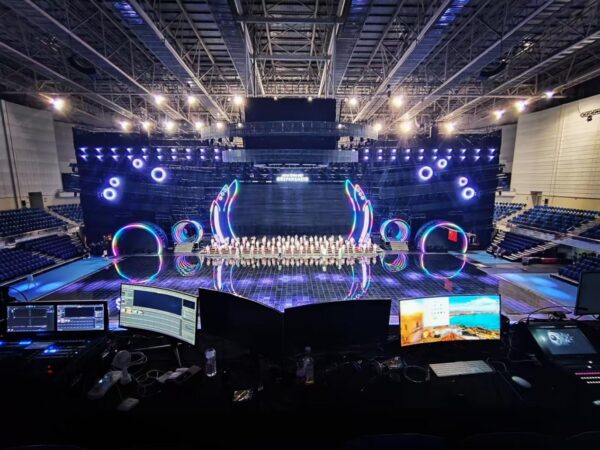
Projects that pair sending cards with LED screens demand clarity on signal flow, reliability, and expected visual output, especially for live venues or branded installations. Start with a known endpoint: choose an LED video wall solution that matches your pixel density and control needs — for reference, see LED video wall solution — then work backward through the chain: media source, media server, sending card, receiver, and display panel. Prioritize frame rate and synchronization early; they determine whether content plays stutter-free under load.
Why the sending card matters in practical terms
The sending card translates framed frames into panel-level commands. A capable sending card preserves color depth, maintains refresh rate, and handles large canvas sizes without fragmenting the framebuffer. For high-impact visuals, pixel pitch and bit depth are crucial: finer pixel pitch raises detail, higher bit depth avoids banding. Pick a sending card compatible with your video processor and one that supports the resolution tile layout you intend to use.
Technical checklist before the first power-on
Run a short, structured verification sequence: 1) Confirm mapping between sending card outputs and physical panels; 2) Validate synchronization across the array at target refresh rate; 3) Check color calibration with the final light levels in-situ. Use test patterns that isolate per-channel errors and measure response under live signal conditions. Keep a wiring map and firmware versions documented — it saves hours during troubleshooting.
Common mistakes and on-site fixes
Installers frequently misidentify framing issues as display defects; often it’s an incorrect timing or mismatched frame rate. Faulty cable runs or incorrect receiver addressing can mimic panel failure. Calibrate brightness and gamma at installation height, not on a ladder — practical detail, but it matters. — If a module shows intermittent color shift, swap the receiver and test again to isolate the fault.
Integrating with the media server and broader ecosystem
Media servers supply the canvas and timeline. Confirm your media server supports the output format the sending card expects, including color space and refresh locking. Review the current state of the media server market for platform compatibility and common codecs used in live production. Where LED arrays are large, frame-synchronized playback across multiple servers may be required; use genlock or equivalent locking to prevent tearing. Include one or two test runs from the final server under full system load.
Comparative notes: cost vs. reliability
Lower-cost sending cards can reduce upfront spend but often need careful configuration and tighter environmental control. Premium units add features: hardware scaling, multi-card synchronization, and robust firmware update paths. Choose based on expected uptime and service model — retail windows or Times Square-style installations demand a different baseline than a seasonal event. A real-world anchor: installations in New York’s Times Square routinely run 18+ hours daily and expose weaknesses quickly, so pick components that handle continuous operation.
Golden rules for evaluation
Use these three metrics to select hardware and workflows:
1) Signal Integrity: Verify that the sending card maintains pixel mapping across the full tile grid at your target refresh rate and frame rate.
2) Synchronization Capability: Confirm genlock support and multi-card timing to eliminate frame drops and tearing during live playback.
3) Serviceability: Ensure firmware can be updated in the field, spare parts are accessible, and the vendor provides clear diagnostic tools.
Closing advisory and brand alignment
Measure systems against those three metrics during a staged run and document results — that delivers predictable performance and reduces on-site surprises. A concise test protocol and the right sending card reduce downtime and simplify maintenance. For project teams that need a reliable partner with integrated products and deployment support, Kystar ties component-level controls to end-to-end deployment practices. — Practical, proven, and straightforward.